Open-Source NotebookLM Alternatives: A Developer's Honest Comparison
Google NotebookLM is genuinely impressive. Drop in a pile of PDFs, research papers, or meeting transcripts and it produces grounded summaries, answers with citations, and — its most-talked-about trick — a surprisingly listenable podcast from your source material. A lot of researchers and indie hackers I know use it daily.
The friction is obvious: your documents go to Google. Fine for public papers. Uncomfortable for anything proprietary — client work, unpublished research, internal strategy docs, personal knowledge bases. And if you want to swap the underlying model? You can't.
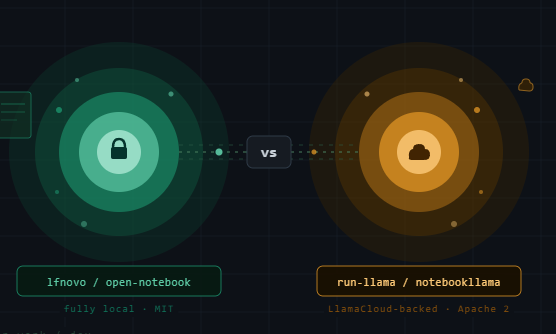
The open-source community has responded. Two repos have risen to the top of GitHub's trending page in 2025–2026. Both call themselves NotebookLM alternatives. Both are written in Python. That's roughly where the similarity ends.
The Two Contenders
1. lfnovo/open-notebook
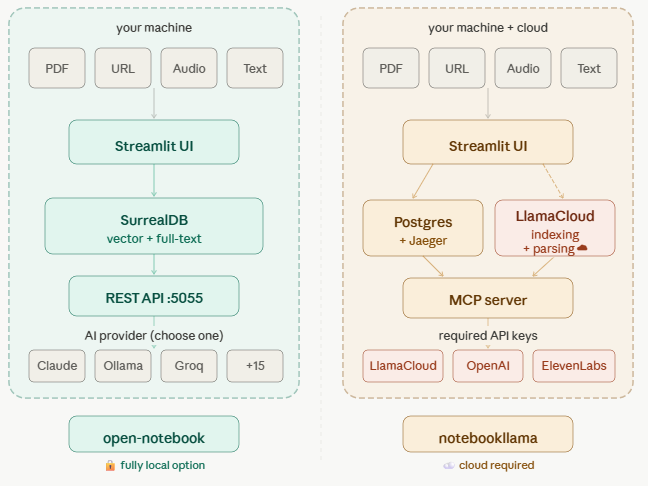
What it is: A genuinely self-hosted, privacy-first research workspace. Everything runs on your machine: the app, the database, the vector search, the embeddings. Your documents never leave unless you explicitly configure a cloud AI provider.
Stack: Streamlit UI · SurrealDB (handles both vector and full-text search in one container) · Docker Compose · REST API on port 5055
Installation:
curl -O https://raw.githubusercontent.com/lfnovo/open-notebook/main/docker-compose.yml
export OPEN_NOTEBOOK_ENCRYPTION_KEY=$(openssl rand -hex 32)
docker compose up -d
# UI at http://localhost:8502 · API at http://localhost:5055
That's it. One command after two setup lines. The compose file spins up SurrealDB and the app. You configure your AI provider(s) from the UI afterward.
AI providers: 18+ — OpenAI, Anthropic, Mistral, Google, Groq, Cohere, xAI, and local models via Ollama or LM Studio. You can mix providers per task: Claude for analysis, a local model for drafting, Whisper-compatible transcription for audio ingestion.
Podcast generation: 1–4 configurable speakers with selectable TTS providers (ElevenLabs, Deepgram Aura, xAI TTS). NotebookLM locks you into two hosts; Open Notebook doesn't.
Data model: SurrealDB handles both indexed full-text search and vector similarity search across all ingested content. Single-container ops — no second database to manage.
Honest limitation: Citations are the weakest point. The maintainer has publicly acknowledged that inline source highlighting is placeholder-quality compared to NotebookLM's grounded, clickable citations. It's being rebuilt, but it's not there yet.
2. run-llama/notebookllama
What it is: A LlamaCloud-backed demo application from the LlamaIndex team. The name and README suggest full self-hosting; the dependency list tells a different story.
Stack: Streamlit UI · Postgres + Jaeger (via Docker) · LlamaCloud (cloud service) · MCP server · uv for package management
Installation:
git clone https://github.com/run-llama/notebookllama
cp .env.example .env
# Fill in: OPENAI_API_KEY, LLAMACLOUD_API_KEY, ELEVENLABS_API_KEY
docker compose up -d
uv run tools/create_llama_extract_agent.py
uv run tools/create_llama_cloud_index.py
uv run src/notebookllama/server.py &
streamlit run src/notebookllama/Home.py
# UI at http://localhost:8501
Five steps, three mandatory paid API keys, and a setup wizard before you can ingest a single document.
What LlamaCloud does here: Document parsing and index pipelines run on LlamaCloud's servers — not locally. This is the core architectural difference. The "self-hosted" label applies to the UI and app logic, not to the intelligence layer.
Where it genuinely shines: If you're already in the LlamaIndex ecosystem, this is the clearest worked example of how to wire LlamaIndex components together at production quality. The MCP server, the Jaeger tracing, the agent pipeline setup — it's well-structured reference code.
Side-by-Side
| open-notebook | notebookllama | |
|---|---|---|
| Truly local? | ✅ Yes (Ollama path) | ⚠️ No — indexing runs on LlamaCloud |
| Installation complexity | Low (1 command) | High (5 steps + wizard) |
| Required paid APIs | 0 (Ollama path) | 3 (LlamaCloud + OpenAI + ElevenLabs) |
| AI provider flexibility | 18+ providers | OpenAI default; others via config |
| Podcast generation | ✅ 1–4 speakers, multiple TTS | ✅ ElevenLabs |
| REST API | ✅ Full | ⚠️ Limited |
| Citation quality | ⚠️ Basic (being rebuilt) | ✅ Solid (LlamaCloud handles parsing) |
| Best suited for | Self-hosted production use | LlamaIndex ecosystem exploration |
| License | MIT | Apache 2.0 |
What Neither Gets Right (Yet)
After running both for a few weeks, here's what I think is still missing — and what would make either project a real NotebookLM replacement for professional use:
1. Inline citation UI that matches Google's
NotebookLM's killer feature isn't the chat — it's the citation highlighting. You click a claim, and the exact source passage lights up. Neither open-source project does this cleanly. Open-notebook's maintainer has acknowledged it; notebookllama inherits LlamaCloud's citation model which is better but not exposed in the UI in the same fluid way. This is the single biggest UX gap.
2. Structured knowledge graph, not just RAG chunks
Both tools use RAG: embed chunks, retrieve by cosine similarity, inject into context. This is fine for "what does document X say about Y" queries. It breaks down for "what are the relationships between concept A across documents B, C, and D." A graph layer (Neo4j, or even SurrealDB's native graph capabilities in open-notebook's case) sitting alongside the vector store would unlock cross-document reasoning that RAG alone can't deliver.
3. Multi-user workspace support
Both tools are single-user by design. NotebookLM added sharing and collaborative notebooks as a key feature. Neither open-source project has this. For teams, this is a dealbreaker. Open-notebook exposes a REST API that could be the foundation — the missing piece is an auth layer and per-user notebook isolation.
4. Smarter ingestion pipelines
Currently, ingestion is "extract text → chunk → embed." For structured documents — financial reports, legal filings, technical specs — this loses table structure, section hierarchy, and cross-reference relationships. LlamaParse (LlamaIndex's parser) handles this better than the default; open-notebook's ingestion pipeline would benefit from a configurable parsing stage that understands document structure before chunking.
5. Podcast generation without the ElevenLabs dependency
NotebookLM's audio overview costs Google nothing because Gemini's native TTS is built-in. Both open-source alternatives route audio through ElevenLabs by default, which adds cost and a third-party dependency. Local TTS has improved dramatically in 2025 (Kokoro, Parler-TTS, Coqui XTTS). Either project could add a local TTS backend that makes the podcast feature genuinely free — the architecture supports it, the wiring just isn't there.
Which One Should You Use?
Use open-notebook if:
- Data sovereignty is a hard requirement
- You want to run against Claude, local models, or anything other than OpenAI
- You're deploying to a VPS or NAS and want Docker Compose simplicity
- You're building something on top of it via the REST API
Use notebookllama if:
- You're exploring the LlamaIndex/LlamaCloud ecosystem and want a production-quality reference implementation
- You already have LlamaCloud credits
- You need the best available open-source citation quality right now
Build on top of open-notebook if:
- You're serious about a NotebookLM competitor. The architecture is sounder, the install story is better, the API surface is richer, and the MIT license gives you more room. The citation gap and the single-user limitation are solvable engineering problems, not architectural dead ends.
One More Thing
The real insight from comparing these two repos isn't about which one is better — it's about what "open source" means in this context. NotebookLlama trades the name recognition of open-source while keeping the intelligence layer proprietary via LlamaCloud. Open Notebook makes the harder architectural choice and actually earns the label.
That gap matters if you're building a product on top of one of them. It matters less if you just want a self-hosted research workspace for personal use.
Either way, the space is moving fast. Open Notebook shipped v1.9.0 on June 2 and hit GitHub's trending page the same day. The right time to pay attention to this category is now.
Questions, corrections, or ideas to extend this? Find me at mentor.work or drop a comment below.
This article was AI-assisted and edited by Mervin. All facts were verified against primary sources before publishing.